
Seedream 5.5 vs Seedream 5.0 Flash: editing curved, multi-line and RTL text in images
We run an image text-editing app where each job generates two 2K PNG variants from one prompt so the pipeline can pick the closer match. On November 13, 2026 we tested ByteDance’s new Seedream 5.5 Edit against Seedream 5.0 Flash Edit on our own synthetic test labels, screenshots and painted signs before switching production.
Our take: Seedream 5.5 Edit followed dense and curved text instructions much more reliably: it kept the relocated postal code on a tight inner arc where 5.0 Flash dropped it, replaced 13 Korean UI lines in one call, and wrote Eastern Arabic numerals (٢٠٢٧.٢.٦) in the right RTL order. The trade-offs are price ($0.068 vs $0.035 per 2K output image on KeelRouter) and latency (47–116 s vs roughly 30–63 s). Where OCR misses part of a ring stamp, neither model can guess what was omitted. Because fewer bad text edits mean fewer retries, we switched our text-editing app to Seedream 5.5 Edit.
Models: seedream-5.5-double-edit, seedream-5.0-flash-double-edit. Tested 2026-11-13, auto_2K PNG, 2 output variants per call, explicit from -> to prompt, same prompts and inputs on both.
Results
| Model | Succeeded | Average time | Average cost per run |
|---|---|---|---|
| Seedream 5.5 Double Edit | 2 / 2 | 69 s | $0.14 |
| Seedream 5 Flash Double Edit | 2 / 2 | 59 s | $0.07 |
Price on KeelRouter
| Option | Seedream 5.5 Double Edit | Seedream 5 Flash Double Edit |
|---|---|---|
| 2k | $0.068 | $0.035 |
per image. Prices follow our catalog and update when providers change theirs.
What changed when we switched production
Latency was the main engineering adjustment. Seedream 5.0 Flash typically finishes a double-2K edit in 25 to 60 seconds; Seedream 5.5 Edit took 47 seconds on the two-line honey label, 90 seconds on the coffee stamp, 102 seconds on the 13-line Korean order screen, and 116 seconds on the Arabic sign. When you move a synchronous or polled UI to Seedream 5.5 Edit, set client timeouts above two minutes and show step-by-step progress rather than a static spinner.
Per output image at 2K, seedream-5.5-double-edit is $0.068 on KeelRouter against $0.035 for seedream-5.0-flash-double-edit (each call returns two PNGs, so a two-variant run bills $0.136 vs $0.07 rounded to two decimals in the run log). On multi-line UI translations and non-Latin scripts, avoiding a second retry offsets much of the per-call difference.
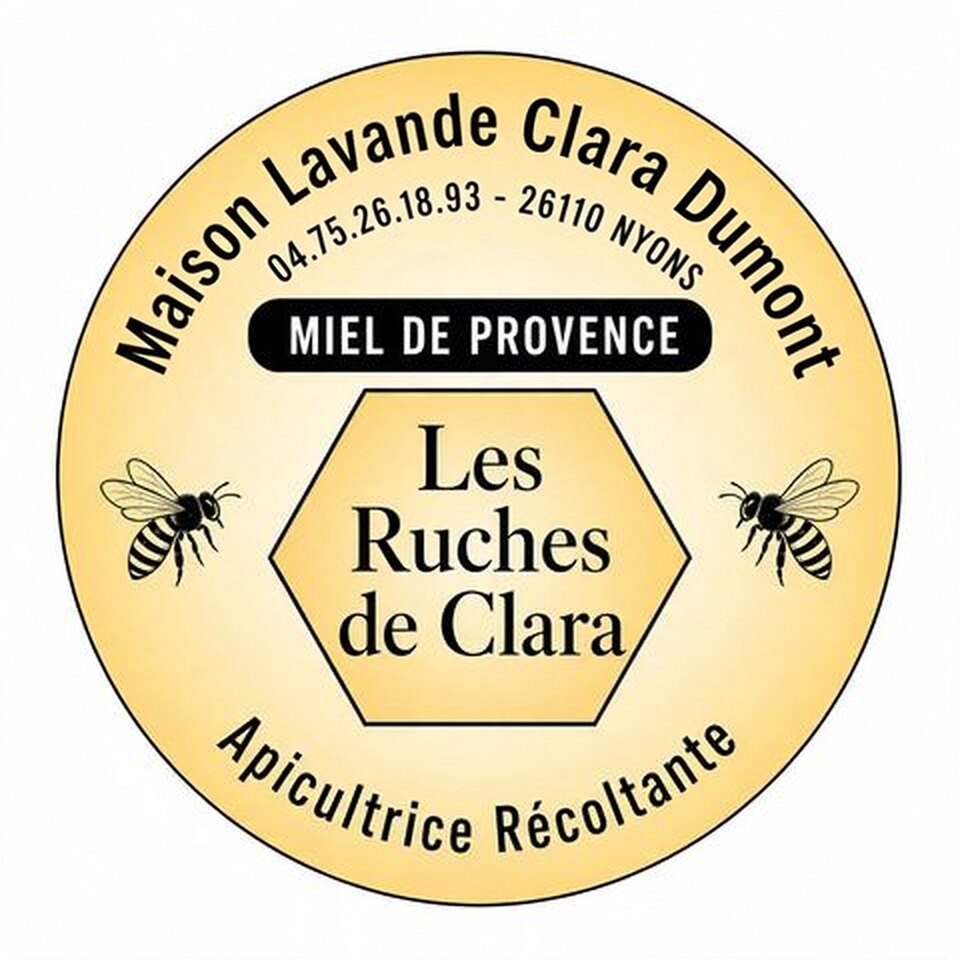
Curved honey jar label: moving a postal code from the outer arc to the inner arc
Synthetic French honey label generated for our curved-text test suite. Both models received the exact same image and prompt, generating two 2K PNG variants per call; each card shows the cleaner of the two variants.
In this image, change the text "Maison Lavande - 26110 NYONS" to "Maison Lavande Clara Dumont"; change the text "04.75.26.18.93" to "04.75.26.18.93 - 26110 NYONS". Keep the same font, size, color, slant and background as the original text. Match the letter height, stroke weight and ink texture of the unchanged text next to it, and keep the same finish: if the original is flat paint or print, the new text is flat too, with no shadow, outline, bevel or 3D effect the original does not have. The new text follows the curve and perspective of the surface it is on, like the original. Do not change anything else in the image.
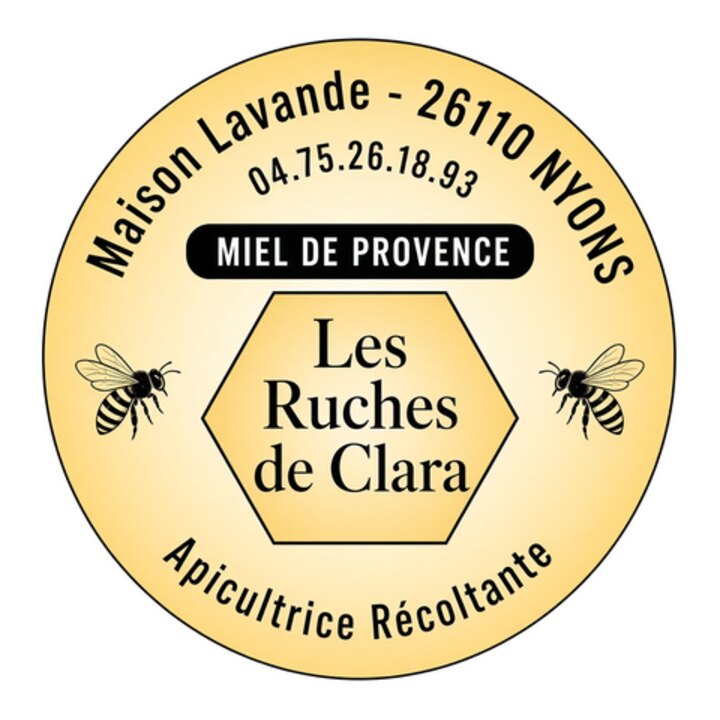
47 s · $0.14 · 2 variants at 2K; both outer and inner arcs match the prompt

54 s · $0.07 · 2 variants at 2K; outer arc updated, inner arc dropped "26110 NYONS"
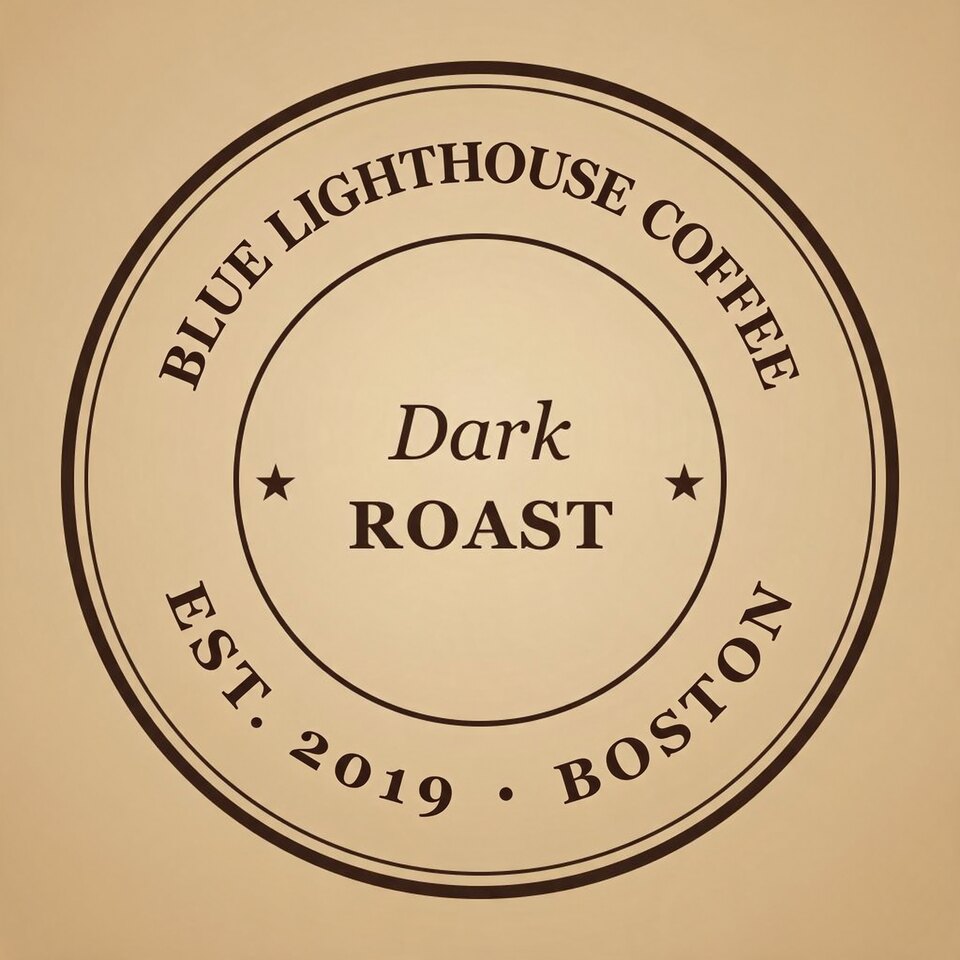
Circular coffee stamp: editing two curved lines when OCR misses the ends of the ring
Drawn locally as an SVG test stamp reading BLUE HARBOR COFFEE on top and EST. 2014 • PORTLAND, MAINE on the bottom. Our OCR step read only HARBOR COFFEE and EST. 2014 • PORTLAND, leaving BLUE and , MAINE out of the replacement prompt.
In this image, change the text "HARBOR COFFEE" to "LIGHTHOUSE COFFEE"; change the text "EST. 2014 • PORTLAND" to "EST. 2019 • BOSTON". Keep the same font, size, color, slant and background as the original text. Match the letter height, stroke weight and ink texture of the unchanged text next to it, and keep the same finish: if the original is flat paint or print, the new text is flat too, with no shadow, outline, bevel or 3D effect the original does not have. The new text follows the curve and perspective of the surface it is on, like the original. Do not change anything else in the image.
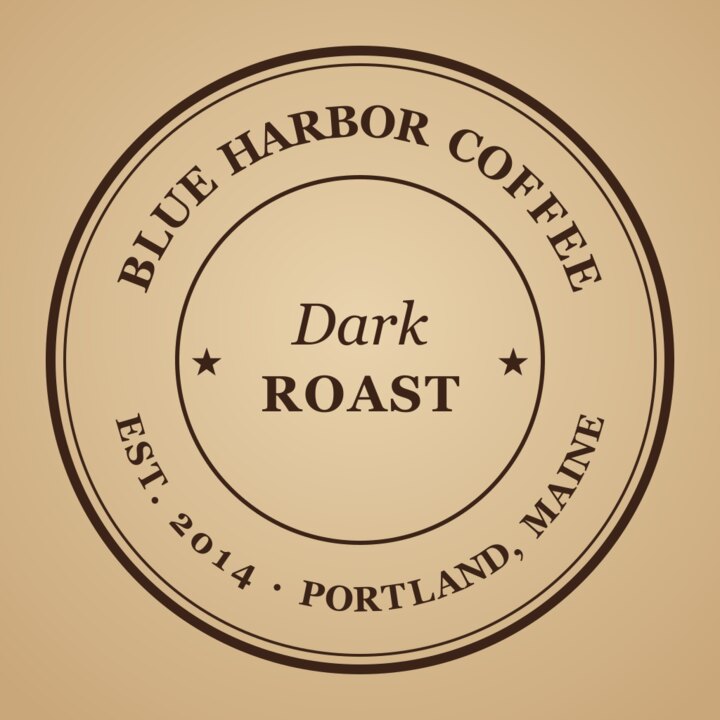
90 s · $0.14 · kept BLUE on the top arc, dropped ", MAINE" on the bottom arc
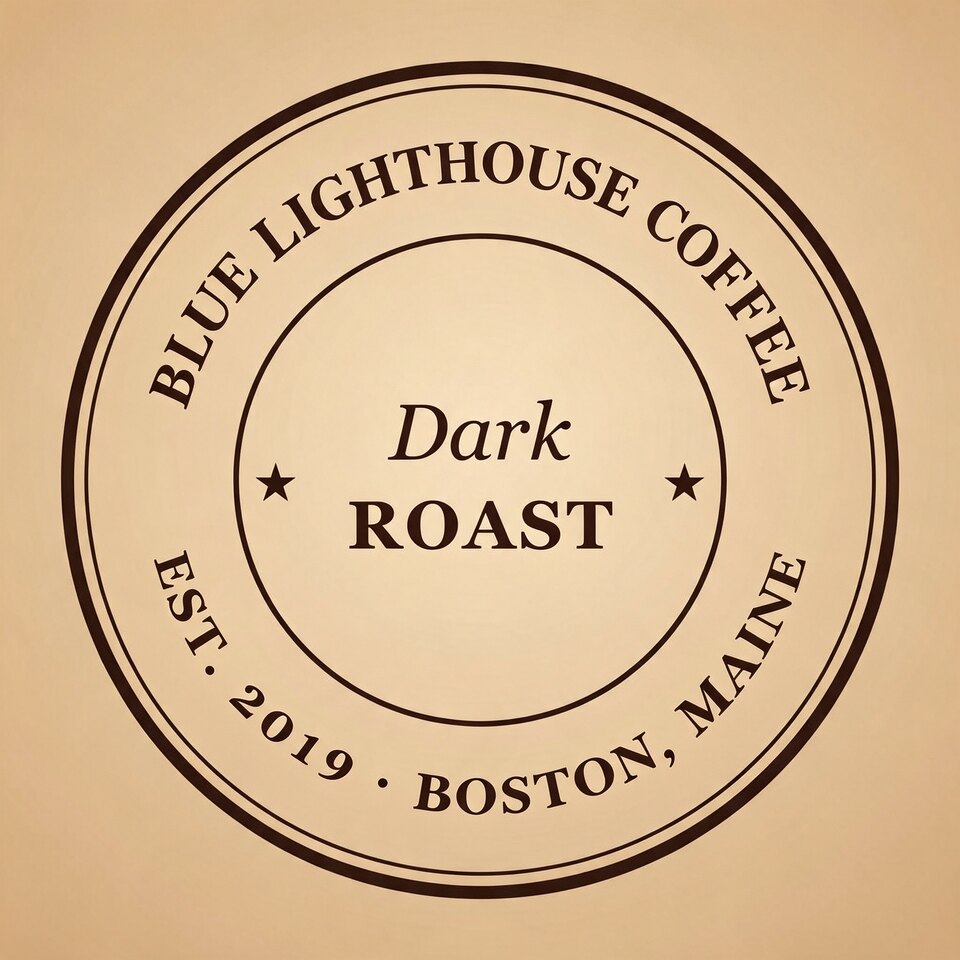
63 s · $0.07 · variant 2 kept both BLUE and ", MAINE"; variant 1 dropped both
13-line Korean order screenshot translated into English in a single call, Seedream 5.5 only
Rendered locally from HTML for our screenshot test set. Our earlier October 14 Seedream 5.0 Flash test on this screen used a generic "Translate all the text in this image into English" prompt (which left untranslated Hangul), not this 13-pair prompt, so this run is excluded from the head-to-head averages above.
In this image, change the text "주문 내역" to "Order Details"; change the text "주문번호 20261013-4471" to "Order #20261013-4471"; change the text "결제 금액" to "Total Paid"; change the text "₩38,500" to "$28.50"; change the text "2026년 10월 13일 오후 7:42 결제 완료" to "Paid Oct 13, 2026 at 7:42 PM"; change the text "상품" to "Item"; change the text "아메리카노 2잔" to "2x Iced Americano"; change the text "매장" to "Store"; change the text "성수점" to "Seongsu Branch"; change the text "픽업 시간" to "Pickup Time"; change the text "오후 8:10" to "8:10 PM"; change the text "적립 포인트" to "Rewards Earned"; change the text "영수증 보기" to "View Receipt". The new text is much longer or shorter than the old text: let the bubble, box or paragraph that holds it grow or shrink to fit, wrapping lines the way the original layout does, and move the content around it up or down as needed. Keep every message or block in its own bubble or box, in the same order from top to bottom, with its own time, name and status marks. Replace the old text completely: none of it stays. Keep the same font, size, color, slant and background as the original text. Match the letter height, stroke weight and ink texture of the unchanged text next to it, and keep the same finish: if the original is flat paint or print, the new text is flat too, with no shadow, outline, bevel or 3D effect the original does not have. Do not change any other text, icon or element in the image.
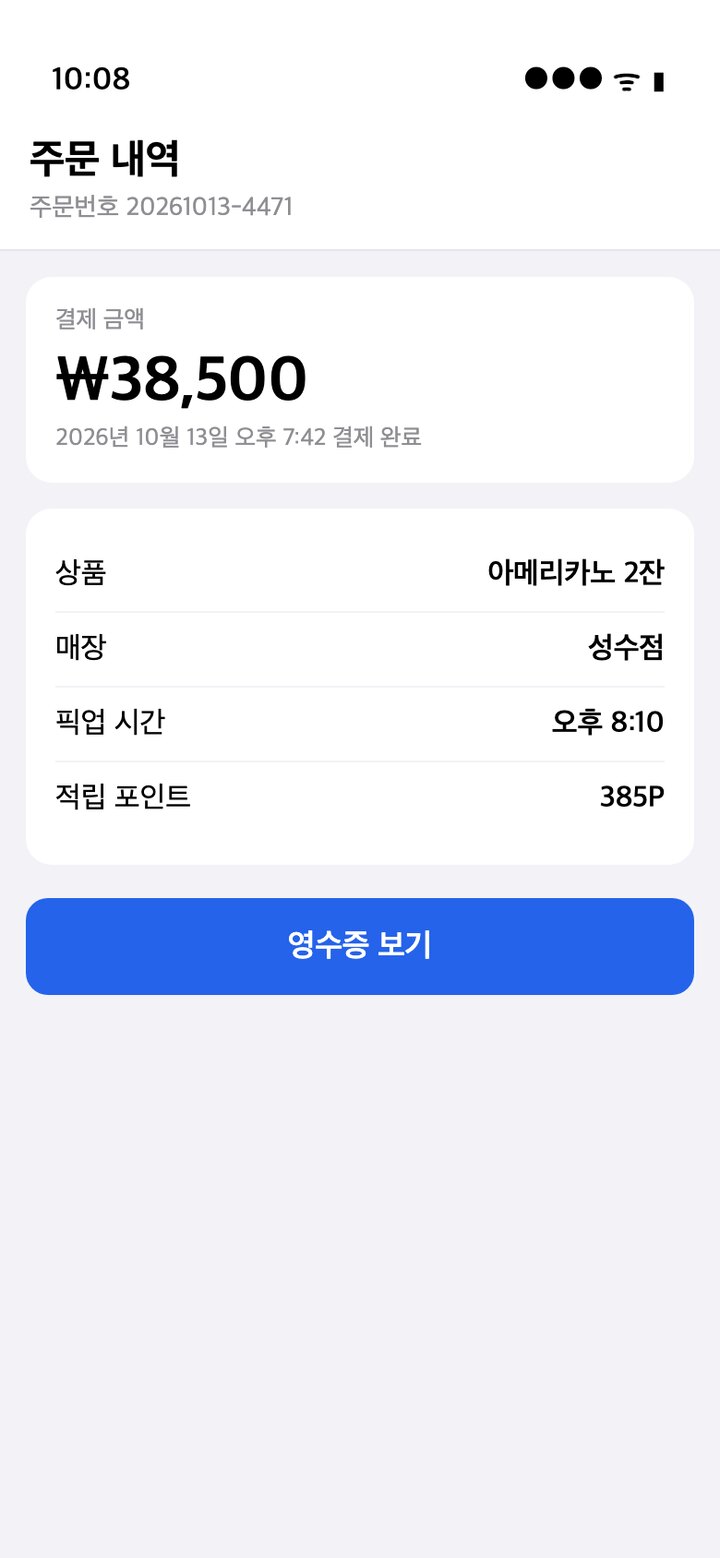
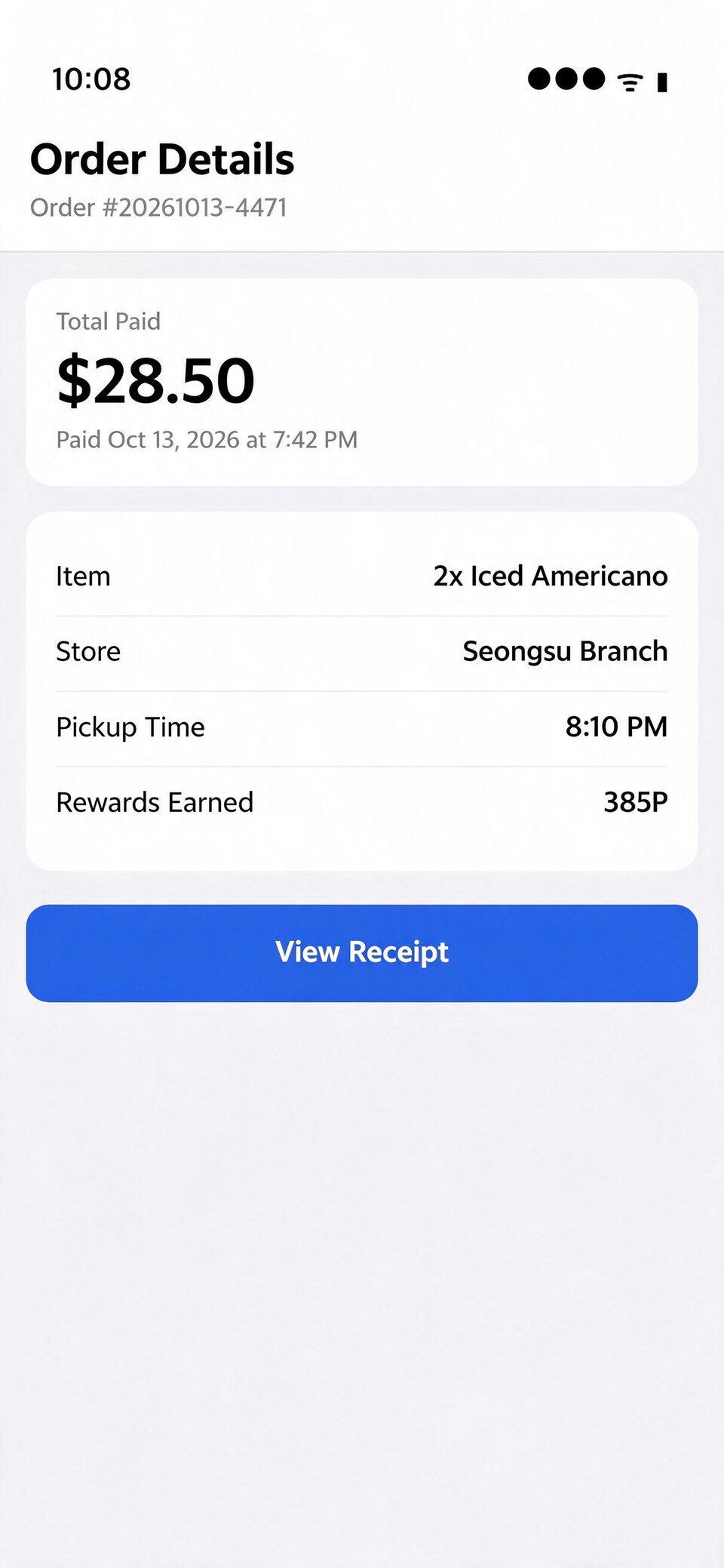
102 s · $0.14 · all 13 lines replaced cleanly; untouched 10:08 and 385P kept intact
Painted Arabic bakery sign with Eastern Arabic date numerals (٢٠٢٧.٢.٦), Seedream 5.5 only
AI-generated wooden storefront sign from our test suite. Our earlier Seedream 5.0 Flash test on this sign used a non-date phrase; we ran this Eastern Arabic numeral prompt on Seedream 5.5 before switching production, so it is shown separately from the two-model averages.
In this image, change the text "مخبز النور" to "مخبز الياسمين"; change the text "خبز طازج يومياً" to "افتتاح ٢٠٢٧.٢.٦ صباحاً". Keep the same font, size, color, slant and background as the original text. Match the letter height, stroke weight and ink texture of the unchanged text next to it, and keep the same finish: if the original is flat paint or print, the new text is flat too, with no shadow, outline, bevel or 3D effect the original does not have. The new text follows the curve and perspective of the surface it is on, like the original. Do not change anything else in the image.
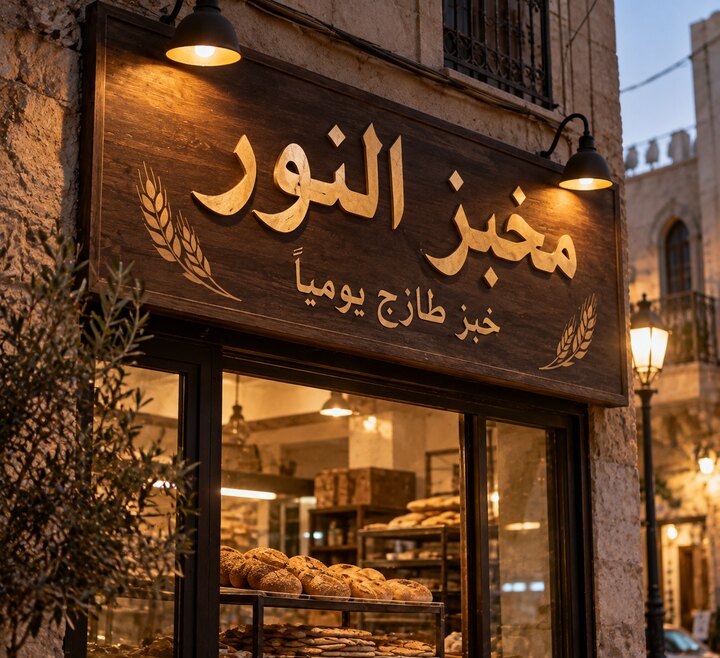
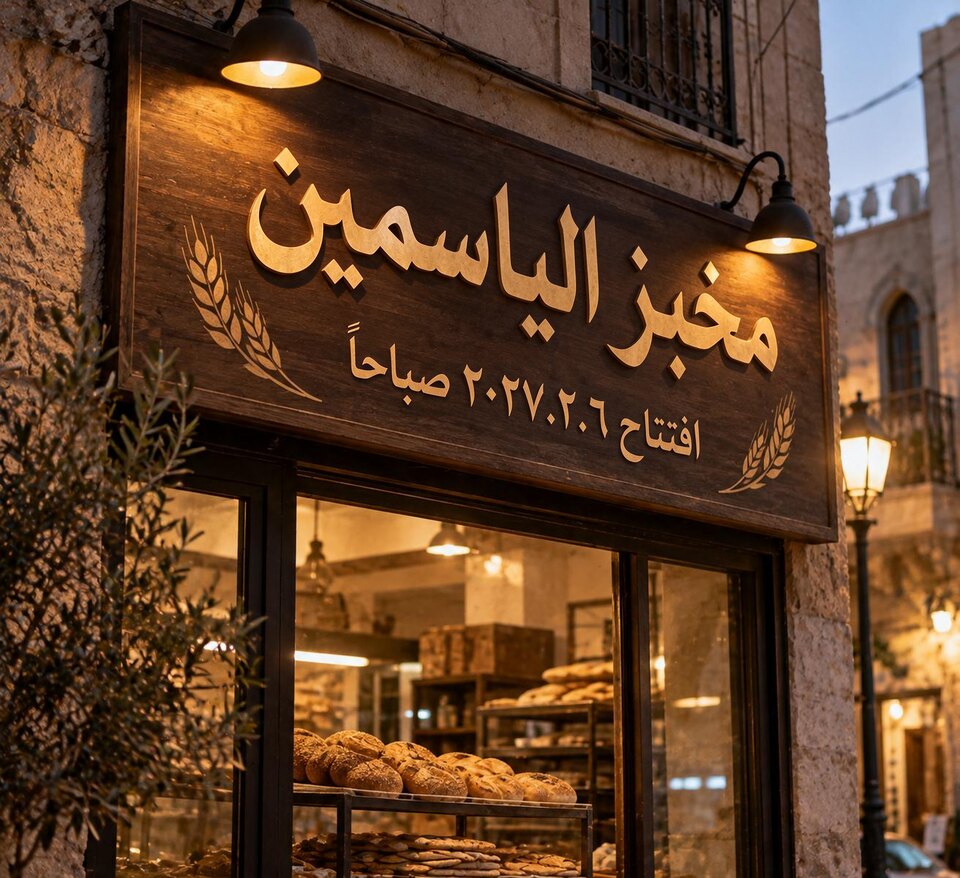
116 s · $0.14 · correct Arabic ligatures, RTL digit sequence ٢٠٢٧.٢.٦ and wood-grain perspective
When to use which
Seedream 5.5 Double Edit
- Kept both curved lines complete when moving a postal code onto a tighter inner arc.
- Handled 13 explicit Korean-to-English replacements in one call without corrupting nearby numbers or icons.
- Wrote RTL Arabic words and Eastern Arabic date digits (٢٠٢٧.٢.٦) in accurate order and perspective.
- Matches flat print, UI text and painted wood finishes without inventing 3D bevels.
- Roughly 1.5x to 3x slower on multi-line and non-Latin edits (47–116 s in our four runs).
- Almost twice the per-image price of 5.0 Flash ($0.068 vs $0.035 per 2K image).
- Still sensitive to incomplete OCR spans on circular stamps (dropped ", MAINE" when the prompt omitted it).
Seedream 5 Flash Double Edit
- Lower cost per 2K output ($0.035 per image) and faster turnaround on short Latin edits.
- Preserved both unscanned outer words (BLUE and , MAINE) on one of its two coffee-stamp variants.
- Still works well for 1–3 straight Latin text lines on signs, memes and screenshots.
- Dropped the relocated postal code ("26110 NYONS") on the tighter inner curve of the honey label.
- More prone to missed characters or layout drift as line count grows past a handful of replacements.
FAQ
- Is Seedream 5.5 Edit better than Seedream 5.0 Flash for changing text in images?
- On hard layouts, yes: in our tests Seedream 5.5 Edit kept relocated curved text that Seedream 5.0 Flash dropped, replaced 13 Korean UI lines in one shot, and rendered Eastern Arabic date digits accurately. On simple 1–2 line Latin edits, 5.0 Flash remains faster and about half the price.
- Why do both models generate two images per call in this test?
- Image edit models occasionally oversize a font or drop an edge word on one seed. seedream-5.5-double-edit and seedream-5.0-flash-double-edit request num_images: 2 at auto_2K PNG in a single call ($0.068 and $0.035 per output image on KeelRouter), letting your pipeline or user pick the cleaner variant.
- How long does Seedream 5.5 Edit take per request?
- In our November 13, 2026 runs at auto_2K with two PNG outputs, Seedream 5.5 Edit took 47 seconds on a two-line curved label, 90 seconds on a ring stamp, 102 seconds on a 13-line UI translation, and 116 seconds on a painted Arabic sign.
- Can I call both Seedream 5.5 Edit and Seedream 5.0 Flash on KeelRouter?
- Yes. Both seedream-5.5-double-edit and seedream-5.0-flash-double-edit accept prompt and image_url on POST https://api.keelrouter.com/v1/image/generations with one KeelRouter API key, and standard single-image generation is also listed at /models/doubao-seedream-5-0-flash.
More comparisons
- Wan 3.0 vs Seedance 2.5: one photo, one prompt, side by side
- Kling 4.0 vs Seedance 2.0 Mini: a pug takes the clapping cat’s place
- Kling 4.0 vs Higgsfield Genjutsu: does the swap respect height?
- Claude Fable 5.2 vs Opus 5.5: price per token vs cost per task
- Gemini 4 Carbon vs Claude Opus 5.5: benchmarks, cost per task and routing
- Seedream 5.5 Layerize vs Seedream 5.0 Pro Layerize: occlusion order and 20+ Live2D parts
KeelRouter is an independent service and is not affiliated with the makers of these models. Model names are trademarks of their owners, used here only to name the model a request runs on. Results are from our own runs on the date above and may differ for other prompts.