
Kling 4.0 vs Seedance 2.0 Mini: a pug takes the clapping cat’s place
Our meme-video app has a Clapping Cat template: you upload your pet and it takes the cat’s place in the clip. On November 9, 2026 we ran the same swap on Kling 4.0 Video Edit and on Seedance 2.0 Mini, with one pug photo, the first 4 seconds of the clapping cat clip posted by @jdbedits7 on TikTok, and the same prompt.
Our take: Kling 4.0 keeps the cat’s expressions far more closely: the bared-teeth grin, the crossed paws, the paw over the mouth. Seedance 2.0 Mini cost about a quarter as much and finished sooner, but its pug smiles politely and presses its paws together instead. For a meme that lives on the face, Kling 4.0 is the one to use.
Models: kling-4.0-video-edit, seedance-2.0-mini. Tested 2026-11-09, 720p, 4 seconds, one pet photo plus a 4-second source clip (720 × 942), same prompts and inputs on both.
Results
| Model | Succeeded | Average time | Average cost per run |
|---|---|---|---|
| Kling 4.0 Video Edit | 1 / 1 | 208 s | $0.96 |
| Seedance 2.0 Mini | 1 / 1 | 150 s | $0.25 |
Price on KeelRouter
| Option | Kling 4.0 Video Edit | Seedance 2.0 Mini |
|---|---|---|
| 720p | $0.12 | $0.051 |
| 480p | — | $0.023 |
per second. Prices follow our catalog and update when providers change theirs.
Clapping cat: the pug from the photo takes the black cat’s place
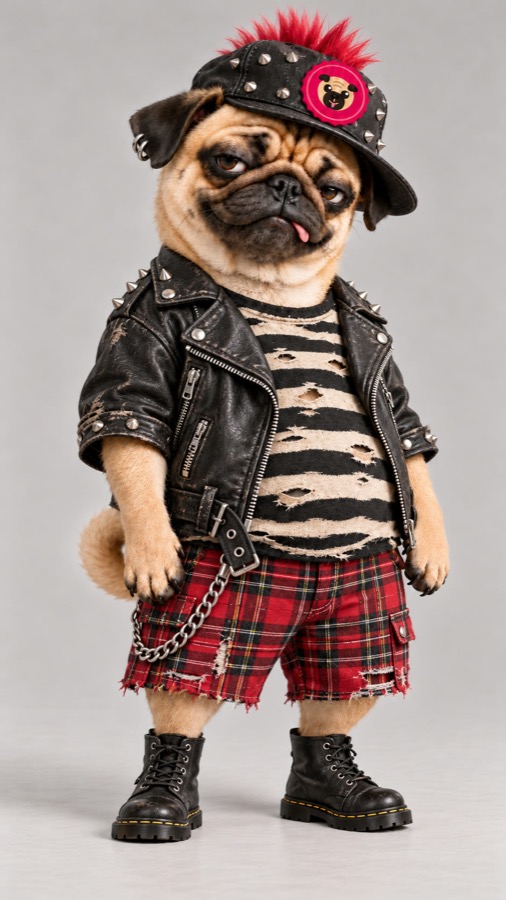
Replace the cat in @video1 with the pug in @image1. Keep the tiled floor, the pink basket in the top corner, the camera angle and every clap of @video1 exactly the same. The pug sits up on its hind legs, grins and claps its front paws, with the same timing and rhythm as the cat. Only the pug from @image1 appears, with no clothes, hat or accessories. Its paws are its own fawn pug paws, not the cat's black paws. Keep its face, fur and markings.
208 s · $0.96 · prompt says <<<video_1>>> and <<<image_1>>>; billed for 4 s of source plus 4 s of output
150 s · $0.25 · prompt says @video1 and @image1; 3:4, no sound
When to use which
Kling 4.0 Video Edit
- The grin matches the cat’s: wide open, teeth showing, at the same moments.
- Crosses its paws where the cat crosses them and puts a paw over its mouth at the end, like the cat.
- Kept the tiles, the basket corner and the camera angle, and dropped the punk outfit as asked.
- When the arms swing wide, the paw tips stay dark and hand-like, taken from the cat.
- Keeps grinning around 2.6 seconds, where the cat’s face has already gone flat.
- Came back with a sound track it made itself, which the prompt did not ask for.
- About four times the price of Seedance 2.0 Mini for this clip, and about a minute slower.
Seedance 2.0 Mini
- Fawn pug paws the whole way through, with nothing left from the cat.
- The calm face around 2.6 seconds matches the cat.
- Kept the floor, basket and camera, dropped the outfit, and cost $0.25 for the clip.
- A polite smile instead of the bared-teeth grin, so the joke of the meme is weaker.
- Presses its paws together, like praying, where the cat crosses them.
- Holds its chin at the end instead of covering its mouth.
- Drew anatomy on the lower belly that the photo does not show.
FAQ
- Which one keeps the expressions of the original clip?
- Kling 4.0 Video Edit, by a wide margin in this test. It copied the grin, the crossed paws and the paw over the mouth frame by frame. Seedance 2.0 Mini kept the rhythm and the scene but softened the face.
- How are the two billed?
- Both count the seconds of the source clip plus the seconds of output. On KeelRouter Kling 4.0 Video Edit is $0.12 per second at 720p, its only tier; Seedance 2.0 Mini with a reference video is $0.051 at 720p and $0.023 at 480p. The final charge follows what the provider reports, so this 4-second clip came to $0.96 and $0.25.
- How do I point the prompt at my video and photo?
- Kling 4.0 Video Edit takes video_url and image_urls and names them <<<video_1>>> and <<<image_1>>> in the prompt. Seedance 2.0 Mini takes reference_video_urls and reference_image_urls and names them @video1 and @image1.
- What source clips does Kling 4.0 Video Edit accept?
- At least 720 pixels on both sides, 3 to 30 seconds long, 24 to 60 frames per second. Our clip was 576 × 754, so we scaled it to 720 × 942 first. Without a duration, the output is as long as the source.
- Is one test enough to choose a model?
- No. This is one clip with one run per model. Try your own clip and photo on both before you switch.
More comparisons
- Wan 3.0 vs Seedance 2.5: one photo, one prompt, side by side
- Kling 4.0 vs Higgsfield Genjutsu: does the swap respect height?
- Claude Fable 5.2 vs Opus 5.5: price per token vs cost per task
- Gemini 4 Carbon vs Claude Opus 5.5: benchmarks, cost per task and routing
- Seedream 5.5 vs Seedream 5.0 Flash: editing curved, multi-line and RTL text in images
- Seedream 5.5 Layerize vs Seedream 5.0 Pro Layerize: occlusion order and 20+ Live2D parts
KeelRouter is an independent service and is not affiliated with the makers of these models. Model names are trademarks of their owners, used here only to name the model a request runs on. Results are from our own runs on the date above and may differ for other prompts.