
GPT Image 2.6 prompts
Prompts that use what is new in 2.6, each written as the request body you send to POST /v1/images/generations. Copy one, change the words, keep the options.
Models: gpt-image-2.6-flare, gpt-image-2.6-sunburst
Text inside the image
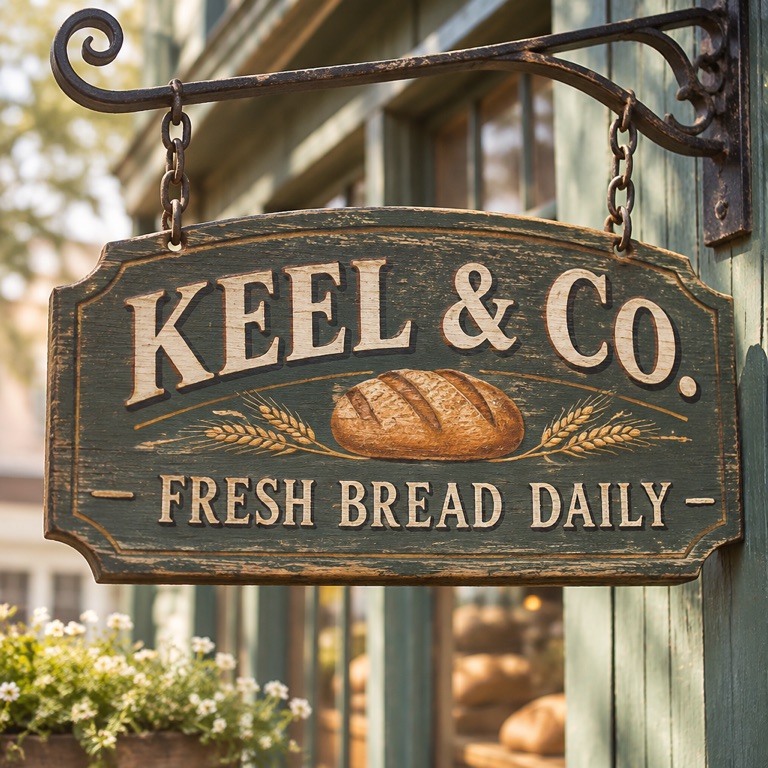
Put the exact words in quotes and say where they go. In our test a short sign came out spelled right at low quality, so start there and raise quality only for small print.
Shop sign
1K low, $0.025. Made on KeelRouter on 2026-11-05 in about 9 seconds.
POST /v1/images/generations
{
  "model": "gpt-image-2.6-flare",
  "prompt": "A hand-painted wooden shop sign that reads \"KEEL & CO. — FRESH BREAD DAILY\", morning light, shallow depth of field",
  "quality": "low",
  "aspect_ratio": "1:1"
}
Menu board with prices
Dense text: use medium quality and complexity high (the default) so the model lays out the lines before drawing.
POST /v1/images/generations
{
  "model": "gpt-image-2.6-flare",
  "prompt": "A chalkboard café menu titled \"TODAY\". Lines: \"Flat white 4.50\", \"Oat latte 5.00\", \"Cinnamon bun 3.75\". Hand-lettered, even spacing, photographed straight on",
  "quality": "medium",
  "complexity": "high",
  "aspect_ratio": "3:4"
}
Edit by drawing on the image (markup_image)
New in 2.6: send the photo as image and a transparent PNG with only your circles, arrows and notes as markup_image. The markup must have the same size as the photo. The prompt says what to do with the marked parts.
Remove what is circled
Two reference images, so two reference-image charges on top of the image price.
POST /v1/images/generations
{
  "model": "gpt-image-2.6-flare",
  "prompt": "Remove everything circled in red and fill the area to match the street behind it. Change nothing else.",
  "image": "https://example.com/street.jpg",
  "markup_image": "https://example.com/street-markup.png",
  "quality": "medium"
}
Edit one area (mask)
A mask is an image the same size as the photo: white where the model may change pixels, black where it must keep them. Use it when the edit must not touch anything else, such as a product photo.
New background, same product
At 2K or 4K an edit needs aspect_ratio; at 1K the output follows the input image.
POST /v1/images/generations
{
  "model": "gpt-image-2.6-flare",
  "prompt": "Replace the background with a light oak table in soft window light",
  "image": "https://example.com/bottle.jpg",
  "mask": "https://example.com/bottle-background-mask.png",
  "resolution": "2K",
  "aspect_ratio": "4:5",
  "quality": "medium"
}
complexity: how much the model plans
complexity is separate from quality. quality sets how detailed the pixels are and decides the price; complexity sets how much the model works out the layout first. Use low for a single subject or a quick variation, high for diagrams, infographics, comics and anything with many labels. It does not change the price on KeelRouter.
Labelled diagram
High complexity for many labels; 2K so small text stays sharp.
POST /v1/images/generations
{
  "model": "gpt-image-2.6-sunburst",
  "prompt": "A clean flat diagram of a drip coffee maker cut in half, with labels: \"Water tank\", \"Heating element\", \"Shower head\", \"Filter basket\", \"Carafe\". Thin arrows, white background",
  "complexity": "high",
  "quality": "medium",
  "resolution": "2K",
  "aspect_ratio": "4:3"
}
Vector icons and consistent sets (output_format: "svg")
Set output_format to "svg" (with n: 1) to get a standalone .svg file with vector paths and a transparent background, without scripts or embedded bitmaps. To generate a matching set of game icons or flashcards, generate one anchor icon first and pass its URL in image_urls on the rest of the batch so every icon shares the same stroke weight and palette.
Flat vector icon as SVG
Returns a .svg vector file with a transparent background. Pass an anchor icon in image_urls to keep a whole batch in the same style.
POST /v1/images/generations
{
  "model": "gpt-image-2.6-sunburst",
  "prompt": "A cute flat vector icon of a wooden spinning top, thick dark navy outline, pastel cream and coral palette, transparent background",
  "output_format": "svg",
  "quality": "low",
  "aspect_ratio": "1:1"
}
Flare or Sunburst
Both take the same options and cost the same; they differ in the look of the result. Send the same prompt to both at 1K low ($0.025 each) and keep the one you like.
FAQ
- What is new in GPT Image 2.6 for prompts?
- Edits guided by drawn markup (markup_image), native SVG export (output_format: "svg") and a complexity setting that controls planning separately from quality. On KeelRouter you also get exact sizes at 1K, 2K and 4K.
- Can GPT Image 2.6 make SVG or GIF files?
- SVG is open: pass output_format "svg" (with n: 1) and you get a standalone .svg vector file, settled at actual reference-image plus writing-model token usage when the task finishes. GIF is not open yet.
- How many reference images can I send?
- Up to 16 in image_urls. Each one adds a reference-image charge.
More guides
KeelRouter is an independent service and is not affiliated with OpenAI. Model names are trademarks of their owners, used here only to name the model a request runs on.